GearChain helps teams add inventory manually, generate unique barcodes instantly, and print labels in the same workflow. That means you can keep inventory accurate, searchable, and ready for scanning later, even if stock arrives unlabeled or a barcode is damaged.
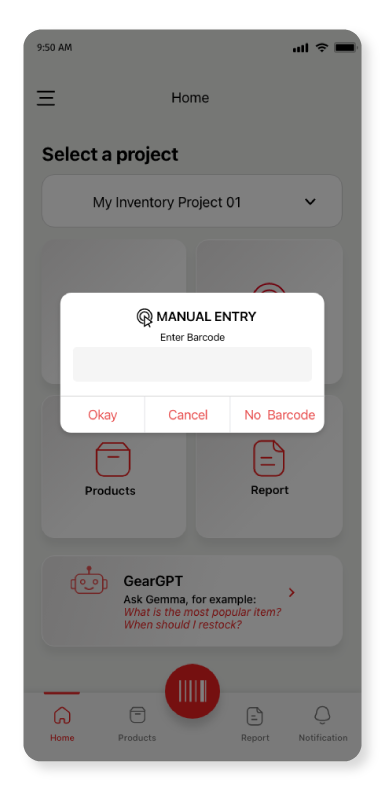
GearChain’s manual entry feature lets you add items without pre-existing barcodes, generate new barcodes automatically, and print labels from the same system. It is useful for unlabeled stock, custom products, returns, damaged labels, audits, and any workflow where you need to capture inventory fast without slowing operations.
Why Use Manual Inventory Entry?
Not every inventory process starts with a clean barcode system. Many businesses deal with:
- unlabeled incoming stock
- damaged or missing barcode labels
- custom, handmade, or one-off items
- returns that need to be re-tagged
- temporary projects, pop-up operations, or field inventory
- audit situations where items must be recorded immediately
GearChain solves this by giving you a simple way to enter inventory manually now and organize it properly for future scanning.
How GearChain Helps You Track Inventory Without Barcodes
Manual Entry for Inventory Items
Add an item by typing in its details when no barcode is available. This ensures every item can still be recorded, found, and managed inside your inventory system.
Automatic Barcode Generation
If an item has no code, GearChain can instantly generate a unique barcode for it. This helps prevent duplicate entries and gives every item a searchable identity.
Built-In Barcode Generator
Use GearChain’s barcode generator to create barcodes directly inside the platform instead of relying on separate tools or extra software.
Label Printing Integration
Once a barcode is created, you can print a label and attach it to the item. This makes it easier to move from manual entry to a standard barcode workflow.
Flexible Barcode Format Support
GearChain supports multiple barcode and label formats, including industry-friendly options, so businesses can match operational and compliance requirements.
Fully Connected Inventory Workflow
Items added through manual entry do not sit in a separate system. They become part of your main inventory flow and can later be searched, updated, scanned, transferred, or exported.
Who This Is Best For
GearChain’s manual entry and barcode generation workflow is especially useful for:
- warehouses receiving inventory without labels
- retailers handling returns or replacement labels
- manufacturers tracking parts or work-in-progress items
- field teams logging tools and equipment
- small businesses starting inventory tracking before full barcode rollout
- businesses managing mixed inventory with both labeled and unlabeled stock
Key Benefits for Businesses
Faster Inventory Capture
Record items immediately instead of waiting for labels, barcode setup, or external tools.
Better Accuracy
Assign a unique code to each item on the spot, reducing missed entries and confusion.
Lower Complexity
Manual entry, barcode creation, and label printing happen in one system, so your team does not have to switch between tools.
More Flexibility
Support items with or without barcodes and adapt to real-world inventory problems without disrupting operations.
Easier Scaling
Start with manual inventory tracking and gradually move into a more barcode-driven workflow as your business grows.
Improved Searchability
Every item gets a record that can be searched and managed later, helping teams stay organized across projects and locations.
Manual Inventory vs Waiting for Barcode Setup
Many teams delay inventory tracking because items do not yet have barcodes. That creates gaps, missed stock, and messy records.
GearChain helps you avoid that delay by letting you:
- add the item manually
- generate a unique barcode instantly
- print a label if needed
- continue managing the item like any other inventory record
This creates a practical bridge between manual inventory tracking and barcode-based inventory management.
Common Use Cases
Unlabeled Stock
Receive items, log them immediately, and create labels later.
Damaged or Missing Barcodes
Replace missing codes without losing item history or slowing down workflows.
Custom or Handmade Products
Create new item records and barcodes for products that never had standard labels.
Returns Processing
Re-enter returned goods, assign fresh labels, and keep records clean.
Quick Audits
Capture missing items fast during stock checks without needing a full relabeling project first.
How It Works
Step 1: Open Manual Entry
Choose the manual entry option inside GearChain when an item has no barcode.
Step 2: Add Item Details
Enter the item information you want to capture.
Step 3: Generate a Unique Code
Use the No Code option to let GearChain create a barcode automatically.
Step 4: Save the Item
The item becomes part of your inventory record and can be searched and managed like any other item.
Step 5: Print a Label
If needed, print a barcode label directly from GearChain and attach it to the item.
Step 6: Continue the Workflow
Later, the item can be scanned, updated, transferred, synced, or reported on within the rest of the system.
Why Businesses Choose GearChain for Inventory Without Barcodes
GearChain is not just a barcode generator. It is an inventory system that helps businesses keep control even when inventory arrives without labels or with incomplete data.
Instead of forcing your team to work around missing barcodes, GearChain lets you keep operations moving with:
- manual item capture
- instant code generation
- label printing
- integrated inventory records
- future-ready barcode workflows
That makes it a strong fit for businesses that need manual inventory tracking software, inventory management without barcodes, or a more flexible way to handle real-world stock conditions.
Get More Control Over Inventory Without Barcodes
If your team works with unlabeled stock, damaged labels, custom items, or mixed inventory conditions, GearChain makes it easier to stay organized. Add items manually, generate barcodes instantly, and print labels from one connected system.
Start managing inventory with more flexibility, better accuracy, and fewer delays.
