Creating a Seamless Inventory Management Experience with GearChain
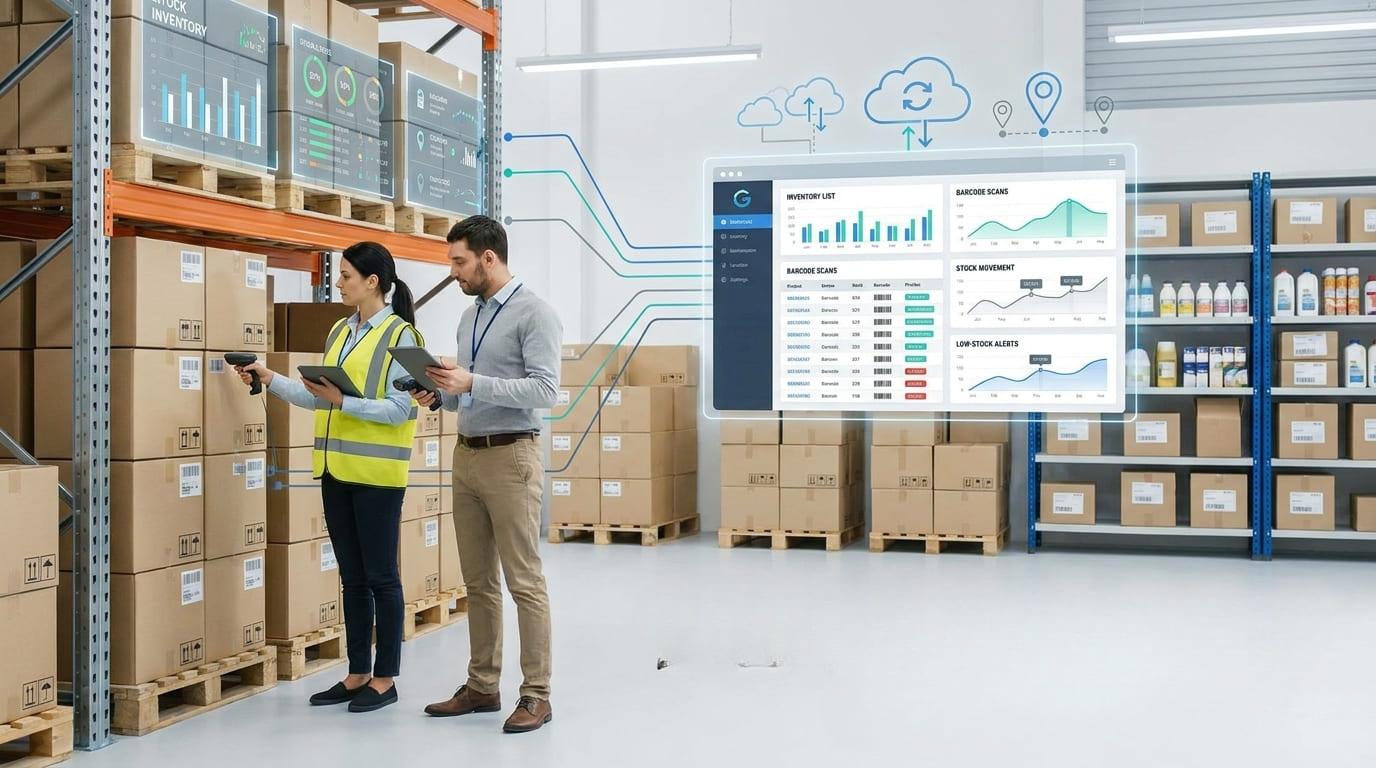
A seamless inventory management experience gives every authorised team member a clear, accurate view of products, assets, stock levels, locations and inventory movements. Instead of relying on disconnected spreadsheets, handwritten records and repetitive data entry, businesses can manage inventory through one centralised system.
Modern inventory management software should do more than record quantities. It should make everyday tasks, including receiving items, scanning labels, transferring stock, checking availability and exporting reports, faster and easier. GearChain supports this approach by combining mobile inventory management, barcode and QR code scanning, real-time updates, custom forms, spreadsheet synchronisation and flexible workflows in one platform.
What Is a Seamless Inventory Management Experience?
A seamless inventory management experience connects people, inventory data and operational workflows without unnecessary friction. Employees should be able to locate an item, scan its barcode, update its quantity or review its product history without moving between multiple systems.
For managers, the experience should provide inventory visibility across teams, projects and locations. For warehouse or field staff, it should simplify stock updates through mobile devices. For decision-makers, it should produce reliable inventory reports that support purchasing, replenishment and resource planning.
The essential components include:
A centralised inventory database
Real-time inventory tracking
Barcode and QR code scanning
Custom inventory forms and fields
Multi-user access with appropriate permissions
Stock movement and product history
Low-stock alerts and quantity thresholds
Data import, export, and spreadsheet syncing
Support for multiple locations and workflows
Together, these capabilities create a single source of truth for inventory operations.
Moving Beyond Manual Inventory Tracking
Spreadsheets remain useful, but they become difficult to control when several employees, locations or product categories are involved. Duplicate files, delayed updates, and inconsistent data entry can create inventory discrepancies.
A digital inventory management system helps reduce these problems by keeping structured inventory records in one accessible platform. Teams no longer need to search through separate documents to confirm stock availability, identify an asset or determine who last updated a record.
GearChain helps businesses move beyond disconnected spreadsheets while retaining the ability to work with familiar tools such as Excel and Google Sheets. Mobile scanning, structured forms and live data synchronisation help reduce human error while maintaining accessible inventory data.
This creates a smoother transition for organisations that want to digitise inventory management without abandoning their existing data immediately.
Centralising Products, Assets and Inventory Data
Centralised inventory management brings essential information together. A product record may include its name, SKU, barcode, image, description, quantity, price, category, storage location and stock threshold.
Businesses can also use custom inventory fields to capture information specific to their operations, such as:
Serial numbers and batch numbers
Supplier or customer details
Inspection dates
Assigned employees
Equipment condition
Project or site information
GPS coordinates
Product tags
Supporting documents
This flexibility is important because inventory workflows differ between industries. A retailer may focus on stock availability and replenishment, while a construction company may need tools tracking, asset transfers and employee accountability. Manufacturers may need visibility into raw materials, work in progress, and finished goods. GearChain supports inventory and asset use cases across retail, manufacturing, construction, healthcare, logistics and farming.
Improving Accuracy with Barcode and QR Code Scanning
Barcode inventory management replaces slow manual searches with scan-based data capture. Each product, asset or storage location can be connected to a unique barcode or QR code.
When an employee scans a label, the system can retrieve the correct inventory record immediately. The user can then adjust stock, confirm receipt, record an issue or transfer the item to another location.
This scanning workflow improves inventory accuracy because employees do not have to type long product codes repeatedly. Barcode inventory systems are widely used to digitise stock tracking, automate data capture and maintain accurate product and warehouse records in real time.
Mobile barcode scanning also removes the need for specialised hardware in many everyday workflows. Employees can use a compatible phone or tablet to update inventory where the work happens.
Maintaining Real-Time Inventory Visibility
Real-time inventory tracking means stock records are updated when inventory activity occurs rather than at the end of the day or week.
When products are received, issued, transferred or adjusted, the latest quantities become visible to authorised users. This helps teams answer important operational questions:
How much stock is available?
Where is a particular item located?
Which products have reached their minimum stock level?
What inventory has recently moved?
Which employee completed the transaction?
GearChain uses live data syncing and mobile updates to help businesses maintain current inventory information. For retailers, this includes real-time visibility, low-stock alerts and multi-location inventory tracking.
Better stock visibility can reduce the risk of stockouts, over-ordering and unnecessary delays. It also gives managers more reliable information for inventory planning and purchasing decisions.
Creating Flexible Inventory Workflows
An effective inventory management system should adapt to the business instead of forcing every organisation into the same rigid process.
Custom forms allow teams to define the fields needed for products, equipment, materials or assets. One workflow may record incoming inventory, while another manages equipment assignments or stock transfers.
Flexible inventory workflows can support:
Goods receiving
Product registration
Stock adjustments
Inventory transfers
Equipment check-in and check-out
Asset assignments
Cycle counting
Damaged-item reporting
Low-stock monitoring
Product history tracking
This makes the platform useful beyond traditional warehouse inventory management. The same centralised system can support parts tracking, tools tracking, vendor-managed inventory, asset tracking and team operations.
Managing Inventory Across Teams and Locations
Multi-location inventory management becomes challenging when every warehouse, store, project or department maintains separate records.
A cloud inventory management platform gives teams shared access to synchronised data. Managers can oversee the wider operation, while staff members work with the records and functions relevant to their responsibilities.
Role-based access and user permissions help protect inventory data while maintaining collaboration. A business can distinguish between administrators and staff, limit access to sensitive information and create greater accountability for inventory changes.
A scalable inventory system should also accommodate additional users, locations, products and transaction volumes as the organisation grows. Current inventory software evaluation guidance consistently treats scalability, integrations, reporting and user support as important selection criteria.
Tracking Inventory Transfers and Product History
Inventory movement is easier to manage when every transaction leaves a clear record.
A product history or inventory audit trail can show when an item was added, updated, transferred or received. It may also identify the responsible user, the previous quantity, the new quantity, and the transaction timestamp.
This visibility improves accountability and simplifies investigations into stock discrepancies. Instead of relying on memory or searching through messages, managers can review the recorded history of an item.
Inventory transfers can also be tracked from a source location to a destination. Statuses such as in transit, received and completed provide a clear view of the transfer workflow and help prevent inventory from disappearing between locations.
Using Alerts, Reports and Data Exports
A seamless experience should help teams act before an inventory problem becomes urgent.
Low-stock alerts and configurable thresholds can identify products that need replenishment. Inventory dashboards can provide a broader view of quantities, recent activity and stock performance.
Reports and spreadsheet exports make it easier to:
Review inventory levels
Analyse stock movement
Share information with stakeholders
Maintain backup records
Perform inventory reconciliation
Support audits
Identify slow-moving or frequently used items
GearChain supports spreadsheet syncing and structured inventory data, helping businesses connect day-to-day inventory control with existing reporting processes.
Building a More Efficient Inventory Operation
A seamless inventory management experience is not created by adding more software or more steps. It comes from simplifying how information is captured, updated, shared and reviewed.
By combining centralised inventory data, barcode scanning, mobile access, real-time tracking, custom workflows, multi-user collaboration and product history, GearChain helps organisations create a more consistent inventory process.
The result is better inventory accuracy, fewer manual tasks, stronger operational visibility and a system that can scale across teams and locations. Businesses can spend less time correcting records and more time using reliable inventory insights to make informed decisions.
FAQs
What is inventory management software?
Inventory management software is a digital system that records products, assets, stock quantities, storage locations and inventory movements. It replaces fragmented manual records with centralised data, real-time updates, barcode scanning, alerts, reports and workflow automation for more accurate inventory control.
How does inventory management software work?
Inventory management software stores item details, quantities, locations and transaction history in a central database. Employees update records through barcode scans, QR codes, mobile forms or manual entries, allowing authorised users to monitor stock availability and inventory movement in real time.
What are the benefits of inventory management software?
Inventory management software improves stock accuracy, reduces repetitive data entry, increases inventory visibility and supports faster product identification. It can also prevent stockouts, simplify inventory transfers, automate low-stock alerts and help teams manage products across multiple users, warehouses or project locations.
How do you track inventory in real time?
Businesses track inventory in real time by recording each receipt, issue, transfer, return or adjustment in a cloud-based inventory system. Barcode scanning, mobile updates and live data synchronisation ensure that stock quantities, locations and transaction records remain current for authorised users.
How does barcode inventory management improve accuracy?
Barcode inventory management connects each item to a unique machine-readable identifier. Scanning the label retrieves the correct record and reduces manual typing, product-selection mistakes and duplicate entries. This creates faster transactions, more reliable stock counts and clearer inventory movement histories.
What features should inventory management software have?
Inventory management software should include real-time tracking, barcode and QR code scanning, stock alerts, custom fields, mobile access, multi-location control, user permissions, inventory history, reports and data exports. It should also be flexible enough to support changing products, users and workflows.

Enter email to get Free Google Sheets Template
We’ll email you a quick verification link. Click it to confirm your address and your template will open automatically.
Enter email to get Free Excel Template
We’ll email you a quick verification link. Click it to confirm your address and your template will open automatically.