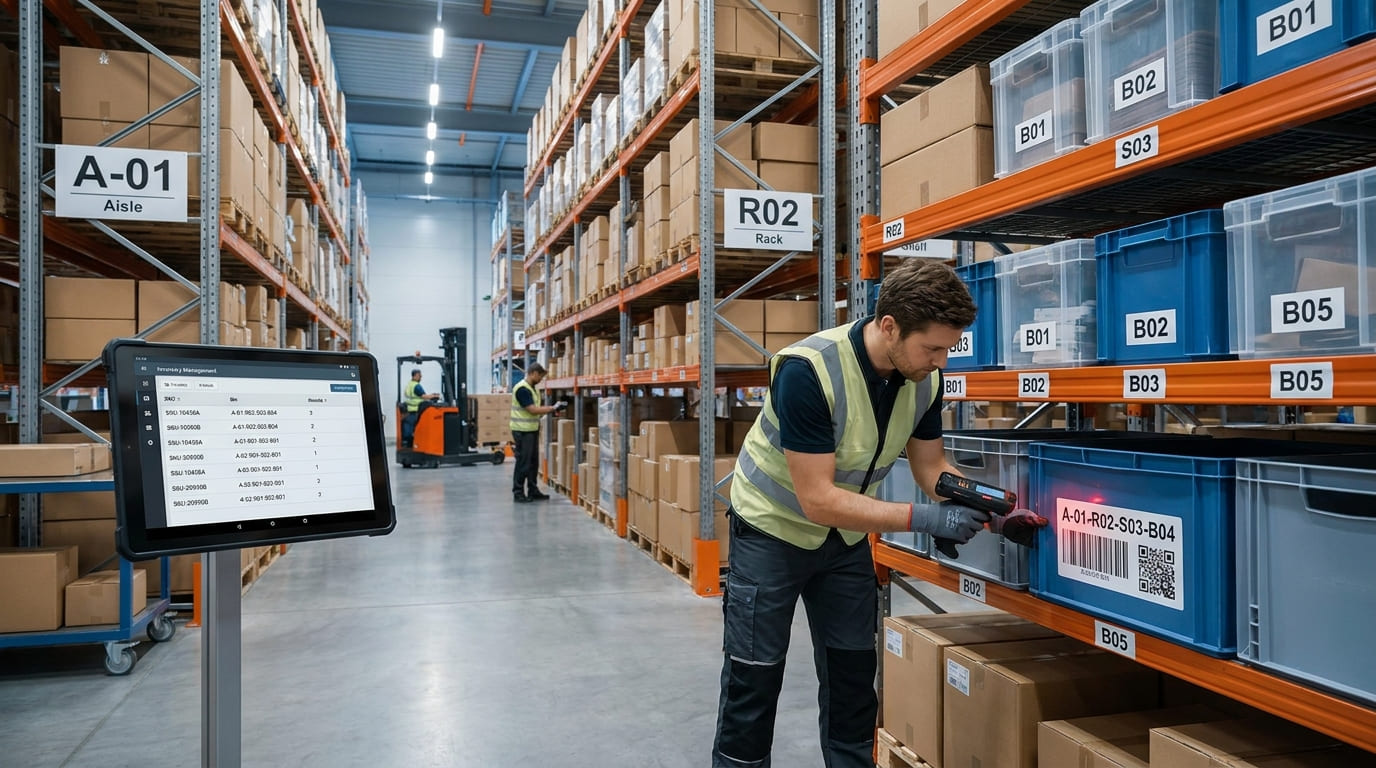
A warehouse can have the correct amount of inventory and still waste time if employees cannot find what they need. Products placed on the wrong shelf, unclear location names, and unrecorded stock movements can slow picking, complicate stock counts, and create inventory discrepancies.
A clear bin location system gives every storage position a unique address. Instead of relying on memory or descriptions such as “second shelf near receiving,” workers can identify exactly where an SKU belongs, where to pick it, and where to return or transfer it.
For businesses managing warehouses, stockrooms, parts, supplies, or multiple storage areas, well-designed warehouse bin locations can make inventory tracking faster, more organized, and more accurate.
What Are Bin Locations in a Warehouse?
A bin location is a specific physical storage position inside a warehouse, stockroom, or inventory area that has its own unique identifier.
The word “bin” does not necessarily mean a plastic container. A bin location can represent a:
shelf position
rack space
pallet location
drawer
cabinet
storage cage
floor position
A common warehouse location hierarchy looks like this:
Zone → Aisle → Rack → Shelf → Bin
For example, A-03-02-04 could identify aisle A, rack 03, shelf 02, and bin 04.
The purpose is simple: both employees and the inventory system should be able to identify the exact physical location of stock without guesswork.
Why Bin Locations Improve Inventory Tracking
Without structured inventory locations, employees often depend on memory or informal product placement. That may work in a very small stockroom, but problems increase as the number of SKUs, storage areas, and employees grows.
A bin location system gives inventory a consistent physical address.
This can help teams:
find stock faster
reduce misplaced inventory
improve picking accuracy
shorten search and walking time
simplify inventory putaway
make cycle counting more organized
record stock transfers correctly
train new employees faster
maintain accurate location records
Bin locations are especially valuable when inventory frequently moves between receiving, reserve storage, picking areas, packing stations, and other warehouse zones.
Step 1: Map Your Warehouse and Storage Areas
Before assigning bin codes, map how inventory physically moves through the warehouse.
Start with major operational areas such as:
Receiving → Storage → Picking → Packing → Staging → Shipping
You may also need dedicated locations for returns, damaged products, quality inspection, quarantine inventory, or reserve stock.
Next, break the storage area into the levels employees actually use. Depending on the warehouse, this may include zones, aisles, racks, bays, shelves, bins, drawers, or pallet positions.
Do not make the hierarchy unnecessarily complicated.
A small stockroom may only need:
Rack → Shelf → Bin
A larger warehouse may require:
Zone → Aisle → Rack → Shelf → Bin
The location structure should match the physical route an employee follows when looking for an item.
Step 2: Create a Consistent Bin Location Naming Convention
Every storage location should have a unique and predictable code.
For example:
A-01-R02-S03-B04
This might represent:
A: warehouse zone
01: aisle
R02: rack
S03: shelf
B04: bin
Your warehouse does not have to follow this exact format. The important part is consistency.
Avoid creating some locations as A-1, others as A01, and others as A-001 unless the differences have a specific purpose.
Using leading zeros, such as 01, 02, and 03, can also help warehouse location codes sort more logically in digital systems and pick lists.
Keep codes short enough for employees to read quickly. Avoid naming physical locations after employees, temporary product groups, or other information likely to change.
The location should remain valid even if a different SKU is stored there next month.
Step 3: Label Every Storage Location Clearly
Once your warehouse location codes are created, place a visible label on every physical storage position.
Labels should be easy to read from the direction employees normally approach the rack or shelf. Use consistent label positions so workers know where to look.
For scan-based inventory tracking, add a barcode or QR code containing the location ID.
This allows a worker to scan the storage location rather than manually entering a long bin code.
Teams creating scannable warehouse identifiers can use barcode labels to connect physical locations with digital inventory records.
Make sure labels remain:
visible
readable
securely attached
large enough to scan
consistent across the warehouse
Replace damaged labels quickly because an unreadable location label can disrupt picking, putaway, and stock counting.
Step 4: Assign SKUs to the Right Bin Locations
After setting up physical locations, decide where individual SKUs should be stored.
Do not simply place inventory wherever space is available without considering how frequently the item moves.
Fast-moving inventory should usually be placed in accessible picking locations. Frequently used products should require less travel than slow-moving or reserve inventory.
Consider:
SKU velocity
product size
weight
picking frequency
storage requirements
bin capacity
products frequently picked together
similarity between neighboring SKUs
Heavy products should be stored where employees can handle them safely. Similar-looking products may need additional separation to reduce picking errors.
For parts operations, keeping location information together with part numbers, sizes, suppliers, and equipment details in a parts tracking workflow can make items easier to identify and retrieve.
Step 5: Choose Fixed or Dynamic Bin Locations
There are two common approaches to inventory location assignment.
A fixed bin location gives an SKU a regular storage position. This is useful for stable, frequently picked inventory because workers quickly learn where products belong.
A dynamic bin location allows inventory to be stored wherever suitable space is currently available. The same SKU may therefore be stored in different locations over time.
Dynamic storage can improve space utilization, but it depends heavily on accurate inventory location tracking.
Many warehouses use a hybrid approach.
Fast-moving products may have permanent pick locations, while additional reserve inventory is stored in flexible locations.
The best approach depends on inventory volume, SKU velocity, warehouse size, available storage space, and how consistently your team records stock movements.
Step 6: Scan the Item and Its Bin Location
Creating warehouse location codes is only useful when inventory movements are recorded accurately.
During putaway, a worker can scan the product and then scan its destination bin. The inventory record can then show both what the item is and where it is stored.
The same process can be followed when inventory is:
received
put away
picked
transferred
returned
counted
moved between bins
This reduces dependence on someone remembering to update a spreadsheet after completing the physical work.
A barcode inventory system can support scan-based inventory workflows by connecting barcode or QR code scanning with stock records and location activity. GearChain currently supports barcode scanning, mobile inventory updates, and inventory tracking across locations.
Step 7: Use Bin Locations to Improve Picking
One of the biggest benefits of warehouse bin locations is faster picking.
Instead of giving a picker only the product name, SKU, or quantity, a pick list can also direct them to the exact storage position.
For example:
SKU 14825 — Location A-04-R03-S02-B01
This reduces the amount of time employees spend walking around looking for stock.
A logical warehouse location system can also help create more efficient pick paths. Fast-moving SKUs can be placed closer to packing or dispatch areas, while slower inventory can occupy less convenient storage space.
Accurate bin locations also reduce the risk of mispicks because employees have another reference point to verify that they are selecting the correct product.
Step 8: Make Cycle Counting Location-Based
Bin locations also make inventory counting easier.
Instead of counting an entire warehouse at once, teams can perform cycle counts by aisle, rack, shelf, or bin.
For example, a team may count all locations in aisle A this week and aisle B the following week.
This creates a systematic counting process and makes discrepancies easier to investigate.
If the total warehouse quantity is correct but five units are stored in the wrong bin, the inventory record may look accurate overall while employees still cannot find those units during picking.
Location-level counting helps identify this type of problem.
Keep Bin Locations Accurate as Inventory Moves
A warehouse location system requires ongoing maintenance.
Whenever inventory moves from one location to another, the location record should move with it.
Review:
misplaced stock
duplicate location codes
damaged labels
unused locations
overcrowded bins
picking errors
fast-moving SKUs
changes in product demand
Products that become faster sellers may need to be moved closer to the picking area. Slow-moving products may be moved into reserve storage to free valuable pick space.
For businesses operating warehouses, stores, stockrooms, or job sites, multiple sites can follow the same location principles while keeping location IDs distinct for each site. GearChain currently supports real-time inventory visibility across multiple locations.
Employees can also use mobile inventory tracking to record stock activity where inventory actually moves instead of waiting to enter information at a desk.
Common Bin Location Setup Mistakes
A good warehouse bin location system should simplify work, not create another layer of confusion.
Avoid common problems such as inconsistent location codes, labels that are difficult to see, duplicate location IDs, overly complicated naming conventions, undocumented stock transfers, and storing fast-moving inventory in inefficient locations.
Another mistake is creating the location structure without involving warehouse employees.
The people receiving, putting away, picking, and counting inventory interact with these locations every day. Their workflow should influence how locations are named, labeled, and organized.
Build Bin Locations Around Real Warehouse Work
The best bin location system is not necessarily the most complex one. It is the system employees can understand and maintain consistently.
Start with the physical warehouse layout. Give every storage position a logical address. Label each location clearly, assign SKUs intentionally, and record stock movements whenever inventory changes position.
Then use picking activity, cycle counts, and inventory discrepancies to improve the setup over time.
When structured bin locations are connected to reliable inventory management, teams can spend less time searching for inventory while maintaining clearer records of where stock is stored, moved, picked, and counted.
FAQs
What is a bin location in a warehouse?
A bin location is a specific storage position inside a warehouse or stockroom that has a unique identifier. It may represent a shelf, rack position, pallet space, drawer, or container, helping workers find, store, count, and move inventory accurately.
How do you set up bin locations in a warehouse?
Start by mapping zones, aisles, racks, shelves, and bins. Create a consistent location naming convention, label each position, assign SKUs to suitable storage areas, and record every putaway, pick, transfer, and count against the correct location.
How do you label warehouse bin locations?
Give each bin a unique, easy-to-read location code based on the warehouse layout, such as aisle, rack, shelf, and bin. Place labels consistently and consider adding barcodes or QR codes so workers can scan and verify locations quickly.
What is a warehouse location numbering system?
A warehouse location numbering system gives each storage position a structured code. A code can combine zone, aisle, rack, shelf, and bin identifiers, allowing employees and inventory software to identify exact storage locations without relying on memory or informal descriptions.
What is the difference between fixed and dynamic bin locations?
Fixed bin locations give specific SKUs regular assigned storage positions. Dynamic locations use available space as inventory arrives, so the same SKU may move between bins. Many warehouses combine fixed pick locations with flexible reserve storage for better space utilization.
How do bin locations improve inventory accuracy?
Bin locations improve inventory accuracy by connecting each SKU to a defined physical position. Clear codes, labels, and scan-based movements reduce misplaced stock, make cycle counts more systematic, and help ensure inventory records reflect where items are actually stored.
