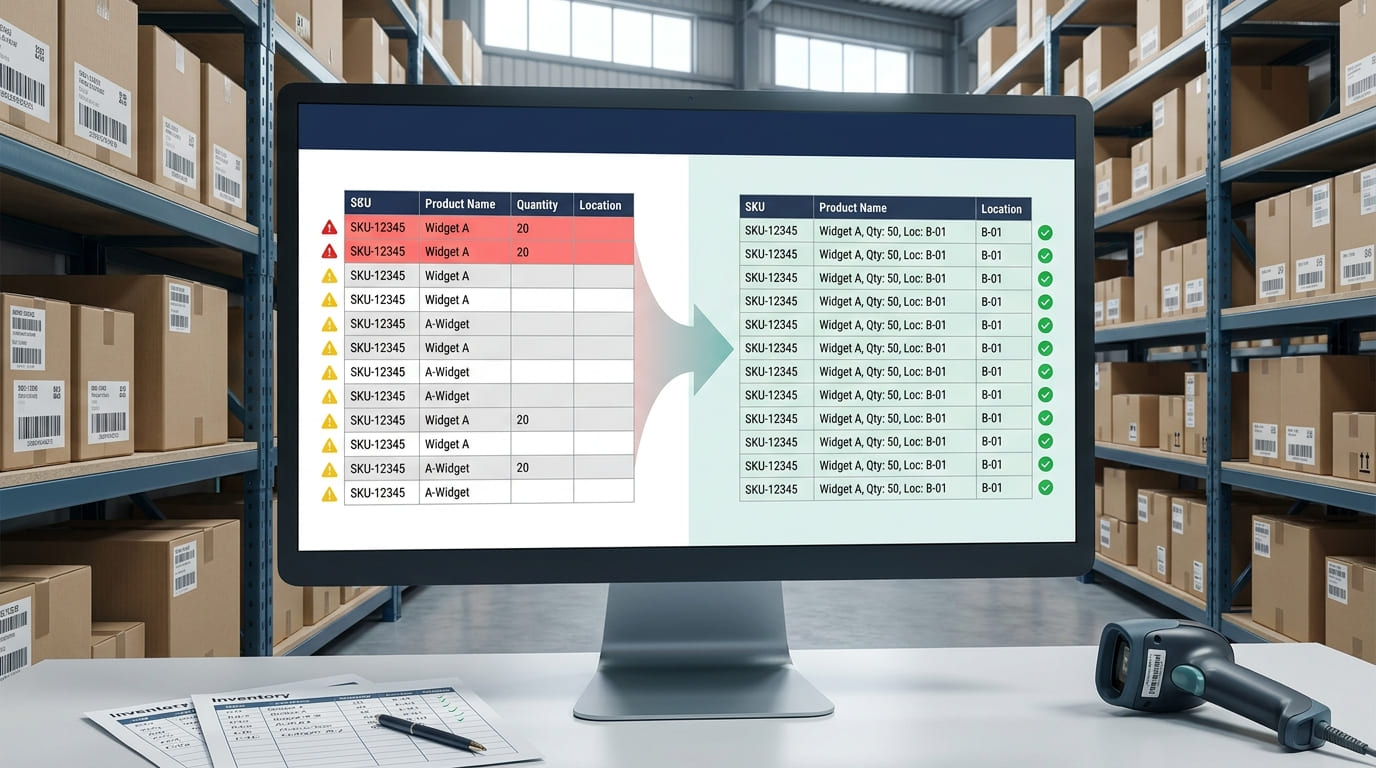
Inventory reports are only useful when the records behind them are accurate. Duplicate SKUs, missing quantities, inconsistent product names, and conflicting location data can make it difficult to know what is actually in stock.
Inventory data cleanup is the process of finding these problems, correcting them, and creating consistent rules for future records. Good cleanup protects item history, improves inventory accuracy, and gives teams a more reliable source of truth for counting, purchasing, reporting, and replenishment.
Whether inventory is stored in spreadsheets or an inventory management system, the principle is the same: clean data makes everyday inventory decisions easier and more reliable.
What Is Inventory Data Cleanup?
Inventory data cleanup, also called inventory data cleaning or cleansing, means reviewing inventory records for errors and making the data complete, consistent, valid, and usable.
Common problems include duplicate product records, missing SKUs, incorrect stock quantities, inconsistent item descriptions, different units of measure, outdated locations, and category or supplier names entered in several formats.
These issues often build slowly. One employee creates “Blue Widget,” another enters “blue-widget,” and someone else creates a second SKU for the same item. Over time, one physical product can appear as several inventory records.
For teams relying heavily on spreadsheets, understanding the limits of spreadsheet inventory helps explain why these inconsistencies become harder to control as products, users, and locations increase.
Why Dirty Inventory Data Causes Problems
Poor inventory data quality affects real operational decisions.
Duplicate records may split stock across two SKUs. Missing quantities can make available inventory look lower than it actually is. Incorrect locations can send employees to the wrong shelf or warehouse, while inconsistent units of measure can distort inventory counts.
These problems can lead to stockouts, unnecessary reorders, excess inventory, fulfillment errors, inaccurate reorder points, unreliable forecasting, poor inventory visibility, and longer stock counts.
The important step is not simply correcting the visible error. Businesses should also determine how that error entered the inventory system so it does not continue happening.
Step 1: Audit Your Inventory Data
Start with an inventory data audit.
Review the fields that identify, describe, locate, and quantify each inventory item. Important fields often include SKU, product name, barcode, category, quantity, unit of measure, supplier, cost, and inventory location.
Look for duplicate SKUs, nearly identical item names, blank required fields, unusual quantities, inconsistent abbreviations, outdated products, and location codes that no longer follow the current structure.
This process is sometimes called data profiling. The goal is to understand the type and scale of inventory data errors before making bulk corrections.
Prioritize fields that influence daily operations first. A missing product description may be inconvenient, but an incorrect SKU, stock quantity, barcode, or warehouse location can immediately affect counting, picking, purchasing, and fulfillment. Clean critical identifiers and stock-related fields before spending time correcting lower-priority descriptive data.
Step 2: Fix Duplicate Inventory Records Carefully
Duplicate inventory records can divide the quantity, movement history, and demand of one item across several records.
Do not immediately delete a record because it looks duplicated. First confirm that both entries represent the same physical product.
Compare the SKU, barcode, product description, supplier, unit of measure, cost, and location. Near-duplicate names do not always mean the items are identical.
Once confirmed, select one master or canonical record as the authoritative version. Preserve useful transaction history, merge valid information, and retire the duplicate according to your inventory process.
If duplicate records are being created during item setup, stronger manual entry rules can help. Unique identifiers, required fields, and consistent item creation procedures reduce the chance of the same product being entered twice.
Step 3: Fix Missing Inventory Data
An inventory record can exist without being complete.
Missing SKUs, barcodes, quantities, product names, locations, categories, suppliers, or units of measure make records harder to search, match, count, and reconcile.
Start by defining which fields are mandatory for every active inventory item. Then identify records where those fields are blank or incomplete.
Avoid guessing missing information. Verify it against a trusted source such as a physical label, supplier document, purchase record, barcode, earlier inventory file, or approved product master.
Where products require reliable identification, a consistent barcode system can reduce repeated typing and help employees update the correct inventory record when stock moves.
Step 4: Standardize Inconsistent Inventory Records
Two records do not need to be duplicates to create confusion.
A warehouse may appear as “WH1,” “Warehouse 1,” and “Main Warehouse.” A unit of measure might be entered as “EA,” “Each,” or “Unit.” Product descriptions may use different capitalization, spacing, abbreviations, or word order.
Create clear standards for SKU formats, product names, categories, units of measure, supplier names, warehouse codes, bin locations, and inventory status values.
Then normalize existing records to those approved formats.
Data standardization makes inventory easier to search, filter, group, report, and reconcile. It also gives employees clear rules when they create new records.
Step 5: Reconcile Records With Physical Inventory
Clean product names and standardized SKUs do not guarantee that inventory quantities are correct.
Inventory reconciliation compares the quantity recorded in your system with the stock that physically exists.
If the system shows 120 units but a physical inventory count finds 112, investigate the eight-unit variance before simply replacing one number with another.
Possible causes include missed receipts, unrecorded transfers, picking errors, damaged products, returns, counting mistakes, or stock movement recorded against the wrong item.
Regular inventory reconciliation helps teams identify inventory discrepancies and correct both the record and the process behind the problem.
Cycle counting can also help detect quantity errors before they become larger inventory accuracy issues.
Step 6: Create One Source of Truth
Inventory cleanup becomes difficult when several spreadsheets or systems contain different versions of the same item.
Decide which inventory record or system is authoritative. Other reports, spreadsheets, or connected tools should reference or sync with that source rather than becoming uncontrolled independent copies.
A structured inventory management process gives teams a clearer way to manage stock records, while spreadsheet sync can reduce repeated copying and manual updates for businesses that still rely on Google Sheets or Excel.
The goal is simple: everyone should work from the same current inventory information.
Step 7: Validate the Cleaned Inventory Records
Before considering the cleanup complete, run data validation checks.
Confirm that active products have unique SKUs, required fields are complete, barcodes identify the correct products, quantities use the expected format, locations actually exist, and product categories follow the same taxonomy.
Validation rules should also detect new duplicate records, missing required values, invalid units of measure, or unexpected stock quantities before those errors spread into reports and workflows.
Data cleaning fixes existing problems. Data validation helps prevent new ones.
How to Keep Inventory Data Clean Over Time
Inventory data cleanup should not become a major project every few months.
Define naming conventions, mandatory fields, validation rules, user permissions, and ownership for important inventory master data. Record stock movements when they happen instead of relying on employees to remember spreadsheet updates later.
Barcode and QR scanning can reduce repetitive manual data entry, while real-time inventory tracking helps keep quantities current.
For businesses operating across warehouses, stores, stockrooms, or job sites, consistent multi-location tracking is especially important. Without common location codes and synchronized records, inventory data can quickly become fragmented.
GearChain can support this workflow through structured inventory records, mobile updates, barcode scanning, and spreadsheet-based reporting. The goal is not only to repair dirty inventory data but to build workflows that produce cleaner records from the start.
Final Thoughts
A practical inventory data cleanup process follows a clear sequence:
Audit → Deduplicate → Complete Missing Data → Standardize → Reconcile → Validate → Prevent
Start by identifying inventory errors before changing records. Treat duplicate SKUs carefully, verify missing information from reliable sources, standardize naming and units, and compare recorded quantities with physical inventory.
Most importantly, fix the process that created the errors.
Clean inventory data depends on consistent item creation, unique identifiers, controlled updates, reliable stock counts, and one clear source of truth.
When inventory records are accurate and consistent, teams can trust stock levels, reports, purchasing decisions, and replenishment plans with far less manual checking.
FAQs
What is inventory data cleaning?
Inventory data cleaning is the process of finding and correcting duplicate, incomplete, inaccurate, or inconsistent inventory records. It typically includes reviewing SKUs, product names, quantities, units, locations, categories, and identifiers so inventory information remains reliable for tracking, reporting, purchasing, and replenishment.
How do you clean inventory data?
Start by auditing inventory records for duplicates, blanks, invalid values, and inconsistent formats. Then merge confirmed duplicates, verify missing information, standardize names and units, reconcile quantities with physical stock, and validate the cleaned records before introducing rules that prevent errors from returning.
How do you remove duplicate inventory records?
First confirm that two records represent the same physical item by comparing SKUs, barcodes, descriptions, units, suppliers, and locations. Select one authoritative record, preserve necessary history, merge useful information, and then retire the duplicate according to your inventory control procedures.
How do you improve inventory data accuracy?
Improve inventory data accuracy by standardizing item creation, requiring essential fields, using unique SKUs or barcodes, recording stock movements immediately, reconciling physical counts with system quantities, restricting uncontrolled edits, and regularly reviewing exceptions such as duplicate, missing, or inconsistent records.
What is inventory reconciliation?
Inventory reconciliation is the process of comparing recorded stock quantities with physical inventory and investigating any differences. It helps identify missing transactions, counting errors, incorrect transfers, damaged stock, or other discrepancies so system records can be corrected and kept aligned with actual inventory.
How do you prevent duplicate SKUs?
Prevent duplicate SKUs by using a defined SKU structure, checking existing records before creating new items, assigning unique identifiers, requiring consistent product fields, and limiting uncontrolled item creation. Barcode-based workflows and validation rules can also reduce accidental duplicate entries across teams and locations.
