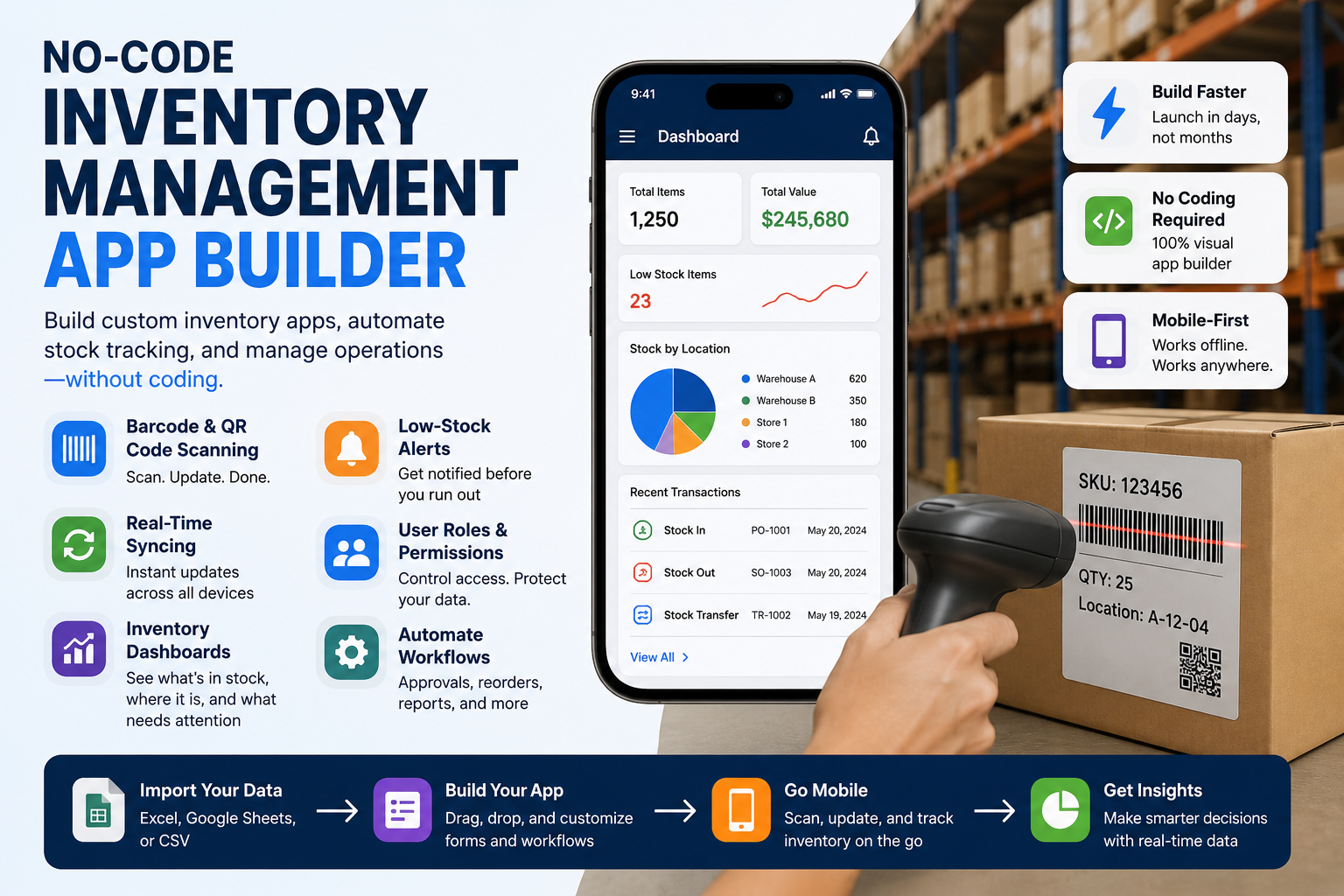
Inventory management has changed. Businesses no longer need to choose between messy spreadsheets, rigid off-the-shelf systems, or expensive custom software development. A no-code inventory management app builder gives teams a faster way to create custom inventory apps, automate stock tracking, and manage daily operations without writing code.
For small businesses, warehouses, manufacturers, retailers, field teams, and asset-heavy operations, this is a major shift. Inventory is not just a list of products. It includes stock levels, SKUs, locations, suppliers, purchase orders, equipment, tools, audit history, barcode scans, user activity, and real-time updates. When this information is spread across paper forms, disconnected spreadsheets, and manual messages, errors become unavoidable.
No-code app builders solve this problem by turning everyday inventory workflows into mobile-friendly, structured, and automated systems. Instead of waiting months for developers, teams can build an inventory tracking app without coding, customize fields, import spreadsheet data, scan barcodes, set low-stock alerts, and view inventory dashboards from one place.
What Is a No-Code Inventory Management App Builder?
A no-code inventory management app builder is a visual platform that allows non-technical users to create inventory apps using forms, fields, workflows, templates, and automation rules. Instead of programming a database, user interface, and mobile app manually, operations teams can design the app around their existing process.
A typical no-code inventory app may include product names, SKUs, barcode fields, QR code scanning, stock in and stock out actions, current stock levels, reorder points, supplier names, warehouse locations, user permissions, and transaction logs. The goal is simple: make inventory control faster, more accurate, and easier for the people who actually use it every day.
This approach is especially useful for businesses that already use Google Sheets, Excel, or CSV files. Instead of replacing spreadsheets completely, a no-code inventory management system can make them more powerful by adding mobile scanning, structured data capture, real-time syncing, and automated reporting.
Why Traditional Inventory Tracking Breaks Down
Many businesses start with spreadsheets because they are familiar, flexible, and inexpensive. At first, a spreadsheet inventory tracker may be enough. But as the business grows, the same spreadsheet becomes harder to manage.
Multiple users may edit different versions. Stock levels may not update in real time. Barcode scanning may be missing. Field teams may send updates through messages. Warehouse staff may record stock movement at the end of the day instead of when it happens. These small delays create bigger problems: inaccurate counts, stockouts, overstocking, lost assets, and poor visibility.
A custom inventory management app reduces these risks by creating a single workflow for data capture. Every stock movement can be recorded through a mobile app. Every scan can update the inventory database. Every team member can follow the same process. This improves inventory accuracy and gives managers a clearer view of what is available, where it is located, and who updated it.
The Main Benefits of No-Code Inventory Apps
The biggest advantage of a no-code inventory app is speed. Instead of building software from scratch, teams can create forms, fields, and workflows quickly. This is useful when a business needs a custom inventory tracking system but does not want the cost, complexity, or delay of traditional app development.
The second benefit is flexibility. Every business tracks inventory differently. A construction team may track tools and equipment across job sites. A manufacturer may track raw materials, work in progress, and finished goods. A retailer may track stock across shelves, back rooms, and storage locations. A no-code stock management system can adapt to these workflows instead of forcing the business into a fixed template.
The third benefit is accuracy. Barcode scanning, QR code scanning, required fields, dropdowns, timestamps, photos, and user permissions reduce manual data entry errors. When teams scan items instead of typing product names, inventory records become cleaner and more reliable.
The fourth benefit is visibility. A mobile inventory management app can help teams track stock levels, item movement, and reorder needs in real time. Managers can review dashboards, check stock across multiple locations, and make decisions based on current data instead of outdated reports.
Key Features to Look for in a No-Code Inventory Management System
A strong inventory app builder should include the features needed for real operational use, not just basic list tracking.
First, it should support custom form fields. Businesses need to capture product names, quantities, categories, locations, supplier details, prices, photos, dates, notes, and status updates. The more configurable the fields, the easier it is to match the app to real workflows.
Second, it should support barcode and QR code scanning. Barcode inventory apps help teams update stock faster, reduce typing errors, and speed up receiving, picking, cycle counting, and asset tracking.
Third, it should provide real-time syncing. When inventory data updates instantly across mobile devices, spreadsheets, and dashboards, teams avoid version confusion and delayed decisions.
Fourth, it should include user roles and permissions. Multi-user inventory management requires control. Warehouse staff may need editing access, managers may need reporting access, and external partners may need limited visibility.
Fifth, it should support automation. Low-stock alerts, reorder notifications, approval workflows, scheduled reports, and inventory movement logs help teams manage inventory proactively instead of reacting after problems happen.
How No-Code App Builders Support Modern Inventory Workflows
Inventory management is not one task. It is a network of connected workflows. A no-code inventory management app can support receiving, stock transfer, order fulfillment, equipment check-in, asset checkout, inventory audits, supplier updates, and field tracking.
For example, a warehouse team can scan a barcode when new stock arrives, enter quantity, choose a location, attach a photo, and submit the record. The system can update the stock balance, timestamp the transaction, and keep a history of the movement.
A field team can use a mobile app to check equipment in and out across locations. A manager can review the dashboard to see which tools are available, which are assigned, and which need maintenance. A retail team can set reorder points so low-stock notifications appear before products run out.
This is where no-code becomes powerful. It is not only about building an app without coding. It is about creating a digital workflow that follows how the business already operates.
No-Code vs Spreadsheets vs Traditional Software
Spreadsheets are flexible but often too manual. Traditional inventory software can be powerful but may be too rigid, expensive, or difficult to customize. No-code inventory management sits between the two.
It gives teams the familiarity of structured data, tables, and fields while adding mobile access, workflow automation, barcode scanning, permissions, and real-time reporting. This makes it useful for businesses that want to move beyond manual tracking without adopting a heavy enterprise inventory system.
A no-code inventory database app can also grow with the business. Teams can start with a simple stock tracking app, then add supplier management, purchase order tracking, multi-location inventory, approval flows, audit trails, and integrations as needs become more complex.
Why No-Code Inventory Management Matters for GearChain Users
GearChain is relevant to this shift because it focuses on no-code mobile inventory and asset management, spreadsheet sync, barcode scanning, custom forms, multi-user workflows, and traceability. Its public pages describe support for Google Sheets and Excel sync, mobile scanning, custom tracking forms, barcode workflows, team collaboration, and optional blockchain-backed records for auditability.
For teams that already manage inventory in spreadsheets, this approach is practical. They do not have to abandon the tools they know. Instead, they can add a mobile inventory app layer that helps capture cleaner data from the warehouse floor, job site, store room, or field location.
That makes a no-code app builder useful not only for inventory management but also for asset tracking, equipment tracking, supply chain visibility, and team operations.
How to Build an Inventory App Without Coding
A simple implementation can follow a clear process.
Start by listing what you need to track: products, SKUs, quantities, suppliers, warehouses, bins, tools, equipment, or assets. Then define the actions users need to perform, such as stock in, stock out, transfer, count, check-in, checkout, reorder, or audit.
Next, create the app structure. Add fields for barcode, item name, current stock, quantity, location, category, date, photo, notes, and user. Import existing inventory data from a spreadsheet if available.
Then add workflow rules. Set reorder points, low-stock alerts, required fields, role-based access, and transaction logs. Test the app with real users before rolling it out fully. The best no-code inventory app is not the one with the most features; it is the one your team can actually use consistently.
Final Thoughts
No-code app builders are changing inventory management because they make custom software accessible to everyday operations teams. Businesses can create inventory apps without developers, replace manual spreadsheets, improve inventory accuracy, automate workflows, and track stock across locations in real time.
For companies that need a flexible, mobile-first, and scalable inventory management system, no-code is no longer just a shortcut. It is a practical way to build better inventory workflows around the way the business already works.
FAQs
1. How do I build an inventory management app without coding?
You can build an inventory management app without coding by using a no-code app builder. Create custom fields for products, SKUs, stock levels, locations, and suppliers, then add barcode scanning, low-stock alerts, user permissions, and real-time spreadsheet syncing.
2. What is a no-code inventory management system?
A no-code inventory management system is software that lets users create inventory tracking apps without programming. It usually includes visual form builders, product databases, barcode or QR scanning, stock updates, dashboards, automation rules, and integrations with spreadsheets or business tools.
3. Can I use Google Sheets or Excel for inventory management?
Yes, Google Sheets and Excel can be used for inventory management, especially for smaller teams. However, adding a mobile inventory app, barcode scanning, automated updates, and structured forms helps reduce manual errors and makes spreadsheet-based inventory tracking more scalable.
4. What features should an inventory management app have?
An inventory management app should include stock tracking, barcode scanning, product records, SKU management, stock in and stock out actions, multi-location tracking, low-stock alerts, user permissions, reports, dashboards, supplier details, and real-time updates across mobile and desktop devices.
5. Is barcode scanning useful for inventory management?
Yes, barcode scanning is useful because it reduces manual typing, speeds up stock updates, and improves inventory accuracy. Teams can scan items during receiving, transfers, picking, cycle counts, and audits, helping keep inventory records current and easier to verify.
6. Why should businesses replace spreadsheet inventory tracking?
Businesses should replace or upgrade spreadsheet inventory tracking when manual updates become slow, error-prone, or difficult to manage across teams. A no-code inventory app adds mobile access, barcode scanning, permissions, automation, real-time visibility, and cleaner inventory data.
