Using Barcodes and QR Codes for Streamlined Inventory Management
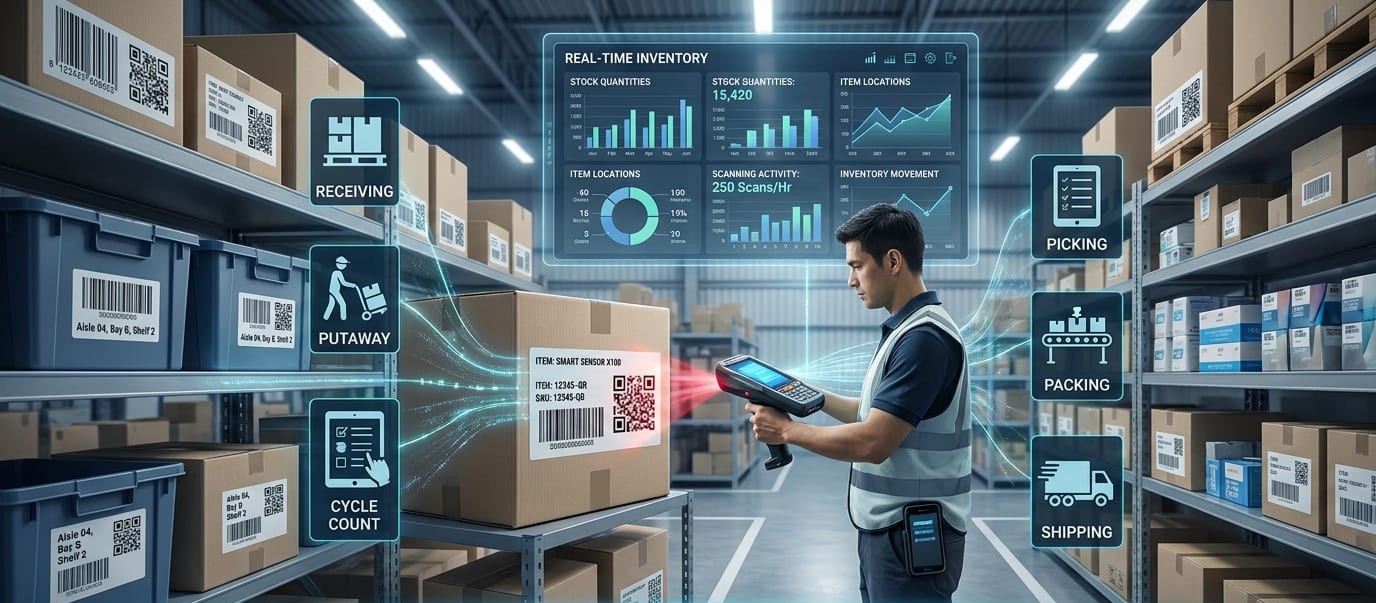
Barcode and QR code inventory management replaces slow manual stock entry with scan-based data capture. By assigning a scannable identifier to products, assets, bins, batches, or locations, businesses can record receiving, transfers, counts, picking, and shipping with fewer keystrokes and more consistent inventory records.
A QR code is a type of two-dimensional barcode, although inventory teams often compare QR codes with traditional linear 1D barcodes such as UPC, EAN, or Code 128. GS1 notes that 2D barcodes can hold more data than 1D symbols and can support richer product information.
How Barcode and QR Code Inventory Management Works
A barcode inventory system connects three things: a physical label, a scanner, and inventory management software. The code identifies the item or record, the scanner captures it, and the software updates the associated inventory data.
A warehouse employee might scan a product during goods receiving, confirm the quantity, and assign a bin location. Another scan can record an inventory transfer. During cycle counting, the same identifier helps verify stock on hand. At picking and shipping, barcode scanning can confirm that the correct SKU and quantity are moving out.
The code itself is not the inventory database. It links a physical item to a digital record containing data such as SKU, product ID, asset ID, quantity, warehouse location, serial number, lot number, batch number, status, or expiry date. GS1 standards support identifiers and attributes including product, shipment, location, serial, batch, lot, and date information.
Barcodes vs. QR Codes for Inventory Tracking
Choosing between a traditional barcode and a QR code depends on the information required, scanning environment, and equipment your team uses.
GS1 describes UPC and EAN as widely used 1D retail barcodes, while QR codes are 2D symbols capable of carrying additional product data. Modern inventory systems can support both formats, allowing businesses to select the most practical code for each inventory workflow.
Why Scanning Improves Inventory Control
The main benefit of barcode inventory management is reducing unnecessary manual data entry. Typing an SKU, quantity, product ID, or location creates opportunities for duplicate records and mistakes. Automated data capture standardizes identification and can improve inventory accuracy, accelerate stock counts, simplify receiving, and strengthen inventory visibility.
Real-time inventory tracking is particularly useful across multiple warehouses, stockrooms, job sites, or field teams. Instead of consolidating disconnected records later, scan events can keep stock levels, inventory movements, and item locations synchronized as stock moves through the operation.
Gearchain, for example, supports real-time inventory updates across multiple locations and uses barcode scanning to reduce manual entry errors while maintaining centralized inventory records.
Where Barcodes and QR Codes Fit in Inventory Workflows
During inventory receiving, employees can scan incoming products and confirm quantities. During putaway, product and bin codes can establish the correct storage location. Inventory transfers can record movement between shelves, warehouses, vehicles, projects, or other sites.
For stocktaking and cycle counting, employees scan items instead of searching inventory records manually. At order picking, packing, and shipping, scan verification can help confirm the correct product before dispatch. The same inventory tracking model supports asset tracking, equipment management, tools, raw materials, finished goods, parts, and supplies.
For deeper product traceability, records may include serial numbers, lot numbers, batch numbers, manufacturing dates, or expiration dates. GS1 2D barcodes can encode identifiers and attributes such as GTIN, batch or lot information, serial numbers, and dates.
How to Set Up a Barcode or QR Code Inventory System
Start with clean inventory data and give each product, asset, or trackable unit a consistent unique identifier such as an SKU, item ID, or asset ID. Decide whether you need one code per product, serialized unit, batch, storage bin, pallet, shelf, or warehouse location.
Choose the barcode format around the workflow. UPC and EAN are familiar for retail products, while Code 128 can suit internal alphanumeric identifiers. QR codes and Data Matrix are useful when a 2D format, additional encoded data, traceability, or smartphone-friendly scanning is important.
Next, generate and print durable inventory labels. Use consistent label placement and test barcode readability before bulk printing. A barcode printer, thermal label printer, or suitable standard printer can support different labeling requirements.
Connect every barcode or QR code to the correct inventory record and define when employees should scan: receiving, putaway, stock transfers, inventory counts, order picking, shipping, returns, check-in, check-out, or stock adjustments.
If inventory data also flows into an ERP, warehouse management system (WMS), point-of-sale system (POS), ecommerce platform, or spreadsheet, test data synchronization carefully. A technically perfect barcode cannot compensate for an inconsistent inventory process.
Mobile Scanning and Connected Inventory Data
Dedicated barcode scanners remain useful for repetitive, high-volume warehouse operations, but smartphones and tablets can make an inventory scanning system easier to deploy. Compatible mobile devices can scan both 1D and 2D codes, allowing teams to update inventory from warehouses, offices, job sites, or the field.
This approach closely matches Gearchain's inventory management model. The platform supports mobile 1D and 2D barcode scanning, QR code scanning, Bluetooth scanner compatibility, barcode and QR code label generation, Google Sheets and Excel synchronization, real-time updates, multi-location inventory, and scan audit history.
For teams moving beyond manual spreadsheet-based stock management, this means familiar inventory data can remain connected while scanning captures inventory movement more consistently. Gearchain also supports existing spreadsheet workflows while adding barcode scanning, custom forms, collaboration, and data synchronization.
Best Practices for Accurate Inventory Tracking
Use unique identifiers consistently, keep barcode labels readable, standardize SKU and location naming, and test labels before bulk printing. Replace damaged labels quickly and avoid placing multiple ambiguous codes together.
Regular inventory audits and cycle counts also matter. Investigate inventory discrepancies, review scan history, and confirm that receiving and shipping processes update the correct records. Reliable barcode inventory control comes from accurate data, durable labels, clear scanning procedures, and disciplined stock management working together.
Build the Inventory System Around the Workflow
Barcodes and QR codes connect physical stock with digital inventory records. Traditional linear barcodes are efficient for straightforward product identification, while QR codes provide a flexible 2D option for mobile scanning, richer data, asset tracking, and supply chain traceability.
The strongest approach is often a mixed system built around operational needs rather than one code type. When inventory labels, scanners, inventory software, real-time synchronization, and employee procedures work together, businesses can reduce human error, improve stock accuracy, strengthen traceability, increase warehouse visibility, and streamline inventory management.
FAQs
1. How do you use barcodes for inventory management?
Assign a unique barcode to each SKU, asset, bin, or location, then connect the code to an inventory record. Staff scan items when receiving, moving, counting, picking, or shipping stock so quantities and locations update without repeated manual data entry.
2. How do you use QR codes for inventory management?
Create a unique QR code for each item, asset, batch, or storage location and link it to your inventory database. Employees can scan the code with a compatible smartphone or scanner to view records, change quantities, log movement, and maintain real-time visibility.
3. What is the best barcode for inventory management?
The best barcode depends on the workflow. UPC and EAN suit retail products, while Code 128 works well for internal inventory and logistics. QR codes or Data Matrix are useful when you need richer data, compact labels, serial numbers, batch details, or mobile scanning.
4. What is the difference between a barcode and a QR code for inventory?
Traditional 1D barcodes usually encode a compact product identifier and work well for fast, repetitive scanning. QR codes are 2D barcodes that can carry more data and support smartphone scanning, making them useful for assets, locations, traceability, and information-rich inventory workflows.
5. Can I use my phone as a barcode scanner for inventory?
Yes. A smartphone or tablet with compatible inventory software can scan many 1D barcodes and QR codes through its camera. Mobile scanning is practical for receiving, cycle counts, asset tracking, and field work, while dedicated scanners may suit higher-volume warehouse operations.
6. What are the benefits of barcode inventory management?
Barcode inventory management reduces manual data entry, speeds up stock counts, improves inventory accuracy, and creates more consistent records. When scans update a connected inventory system in real time, teams gain better visibility into quantities, locations, transfers, receiving, picking, and audit history.

Enter email to get Free Google Sheets Template
We’ll email you a quick verification link. Click it to confirm your address and your template will open automatically.
Enter email to get Free Excel Template
We’ll email you a quick verification link. Click it to confirm your address and your template will open automatically.