Which GS1 Tools Allow Batch Barcode Generation?
Published
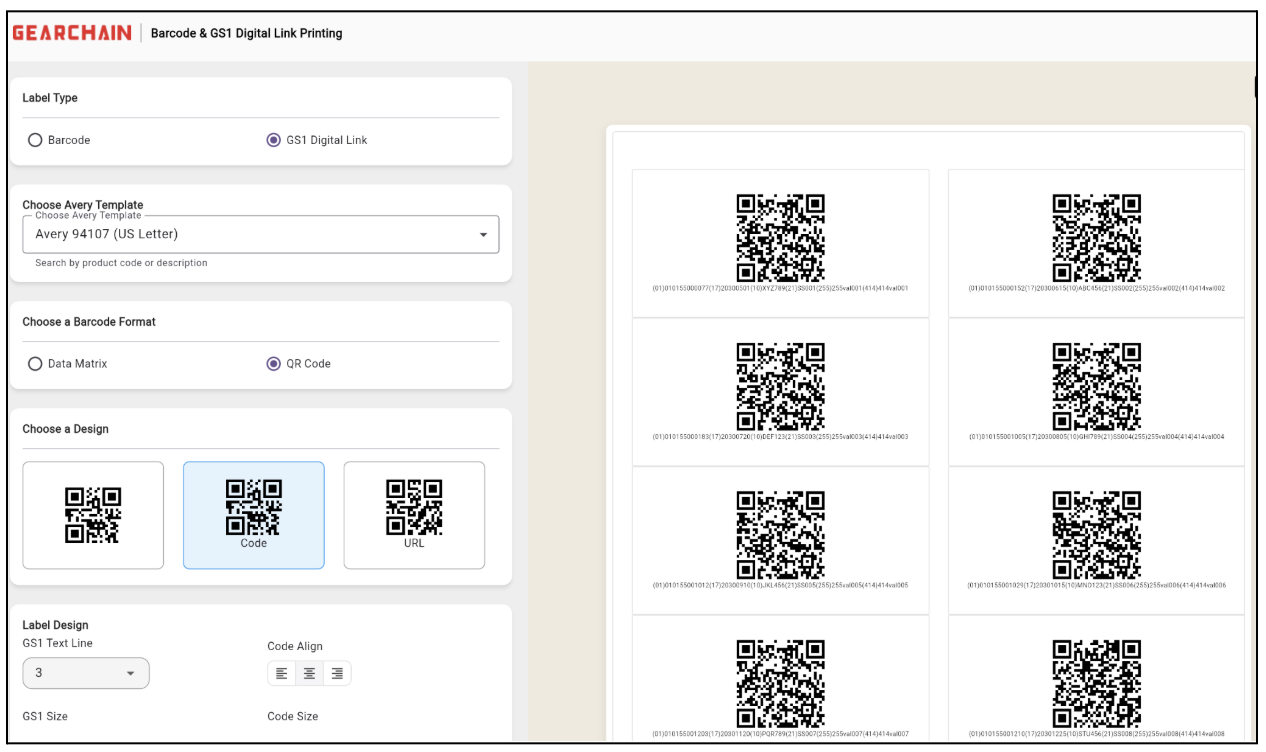
Most labeling tools handle one barcode at a time. That works fine until you need to label a hundred products before a shipment goes out. GearChain was built for exactly that situation — upload a CSV, generate all your labels at once, and print them straight away.
GearChain's free bulk barcode and GS1 Digital Link label generator helps businesses generate multiple barcode labels at once, print them using Avery templates, and prepare for more advanced GS1 workflows without added complexity.
Batch Barcode Generation Made Simple
Got a spreadsheet of products that all need labels? Upload it. GearChain reads the data and generates every barcode in one go. No clicking through items one by one.
A few situations where this saves real time:
- print many barcode labels at once
- create labels from spreadsheet data
- prepare inventory for storage, shipping, or scanning
- improve speed and reduce manual labeling work
There is no technical setup involved. If you can fill in a spreadsheet, you can use this tool.
Generate Your Barcode Labels Now
Upload a CSV to create and print multiple barcode or GS1 Digital Link labels at once.
Create Bulk Barcode Labels from a CSV File
One of the most useful features of GearChain's label generator is CSV-based batch creation. This allows you to upload product or inventory data and generate multiple barcode labels in one go.
That means you can move from spreadsheet data to printable barcode labels much faster, which is ideal for:
- inventory setup
- warehouse relabeling
- product tagging
- internal stock identification
- operational barcode rollouts
For businesses already using spreadsheets, this makes the transition to faster barcode generation much easier.
Supported Barcode Types
GearChain supports a wide range of barcode types for different business needs, including:
- UPC
- EAN
- Code 39
- Code 128
- QR Code
- DataMatrix
Whether your operation uses older 1D barcodes or newer 2D formats, GearChain handles both without needing separate tools.
Customizable Label Layouts for Real-World Use
A barcode that cannot be read on the shelf is useless.
GearChain lets you adjust label size, text placement, and barcode dimensions so the finished label actually works in your environment.
Avery templates are supported, so you can print straight onto label sheets you already stock.
The result is a label that scanners can read and staff can understand at a glance.
Bulk GS1 Digital Link Label Generation
GearChain also handles GS1 Digital Links in bulk. Upload your CSV, and the tool generates web-connected labels at the same scale as standard barcodes — no extra steps needed.
A GS1 Digital Link is a QR code with a web address built into it. Scan it and it pulls up live product data:
- traceability details
- batch or lot data
- expiration information
- authenticity checks
- product content or digital experiences
If your industry is moving toward 2D barcodes or you need to share product data with customers and partners, GS1 Digital Links are worth adopting sooner rather than later.
Why GS1 Digital Links Matter
GS1 Digital Links expand the role of barcode labels beyond basic identification. Instead of only pointing to a product number, they can connect physical items to dynamic online information.
This creates real advantages for businesses that want to improve:
- traceability
- product transparency
- supply chain visibility
- digital customer experiences
- readiness for the GS1 Sunrise 2027 shift to 2D barcodes
The industry is moving in this direction. Getting familiar with GS1 Digital Links now means less disruption when they become a standard requirement.
Traditional Barcodes and GS1 Digital Links Can Work Together
Your existing barcode setup does not need to be replaced. Standard 1D barcodes keep working exactly as they do now. GS1 Digital Links sit alongside them for use cases where richer data matters.
Run both in parallel. Use standard barcodes for internal scanning and GS1 Digital Links where customers or supply chain partners need more information.
This makes GearChain useful for teams that need to support today's barcode operations while preparing for the future.
Works with GearChain's Broader Inventory and Tracking Workflows
Labels created in GearChain connect directly to the inventory system. Print a label, stick it on an item, scan it in the warehouse — the record updates straight away. No separate tool needed to bridge the gap.
That helps teams:
- Scan and update inventory faster
- Reduce spreadsheet-based errors
- Improve visibility into stock and movement
- Manage labeling and tracking in one connected workflow
For businesses looking for more than just a basic barcode creator, this adds practical long-term value.
Need More Than Barcode Labels?
Use GearChain to print labels, scan inventory, update quantities, and track stock movement in one connected system.
A Faster Way to Create Bulk Barcode and GS1 Labels
Need to label a hundred products before end of day? Upload your spreadsheet, pick your format, and print. GearChain handles the rest.
Whether it is a one-off warehouse relabeling job or an ongoing labeling workflow, the tool works the same way every time.
Try GearChain's free bulk barcode and GS1 Digital Link label generator to create labels faster and simplify your workflow.
FAQ
Tools that support CSV uploads, bulk label creation, and flexible barcode output are best suited for batch barcode generation. GearChain is designed specifically to help users generate multiple barcode and GS1 Digital Link labels at once.
Yes. GearChain allows users to upload CSV data and generate multiple barcode labels in one workflow, making it easier to create labels at scale.
Yes. GearChain supports bulk GS1 Digital Link label generation, allowing businesses to create web-connected labels directly from structured data.
GearChain supports UPC, EAN, Code 39, Code 128, QR Code, and DataMatrix barcode formats, as well as GS1 Digital links.
Yes. GearChain supports Avery templates, making it easier to print barcode labels in commonly used formats.
GS1 Digital Link allows a barcode or QR code to connect users to online product information such as traceability data, batch details, expiration information, and other digital content.
Yes. GearChain is useful for inventory labeling, warehouse barcode printing, product identification, and broader tracking workflows.
No. GearChain’s label generator is designed to be easy to use without coding or design experience.

Enter email to get Free Google Sheets Template
We’ll email you a quick verification link. Click it to confirm your address and your template will open automatically.
Enter email to get Free Excel Template
We’ll email you a quick verification link. Click it to confirm your address and your template will open automatically.