What Is SKU and MOQ? A Beginner’s Guide to Inventory Basics
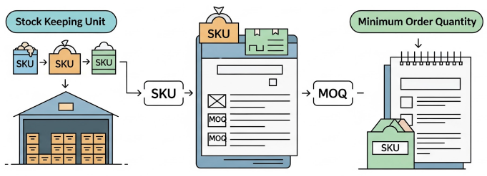
If you are new to inventory management, two terms come up again and again: SKU and MOQ. They sound technical at first, but they are actually simple once you understand what each one does.
A SKU helps you identify and track products inside your business. An MOQ tells you the minimum quantity a supplier is willing to sell in one order.
Understanding both helps you make better inventory decisions, avoid overstock, improve purchasing, and keep product records organized as your business grows.
Quick Answer
- SKU stands for Stock Keeping Unit. It is an internal code businesses use to identify and track products or product variations.
- MOQ stands for Minimum Order Quantity. It is the minimum number of units a supplier requires you to buy in one order.
In simple terms, SKU helps you manage inventory, while MOQ affects how you buy inventory.
Why SKU and MOQ Matter
Many inventory problems start when businesses do not clearly understand how products are tracked and how supplier requirements affect purchasing.
When you understand SKU and MOQ, you can:
- organize product variations more clearly
- avoid ordering the wrong quantity
- improve stock planning
- reduce excess inventory
- make purchasing decisions with more confidence
- keep inventory records consistent across channels
This is especially important for retailers, eCommerce sellers, wholesalers, and small businesses trying to scale efficiently.
Managing more SKUs than a spreadsheet can handle?
GearChain helps you organize SKUs, scan product barcodes, update stock quantities, and synchronize inventory records with Google Sheets or Excel.
What Is a SKU?
SKU stands for Stock Keeping Unit.
A SKU is a unique internal code that a business creates for each product or product variation it sells. It helps staff quickly identify, track, and manage items in inventory.
Simple SKU example
Imagine you sell T-shirts in 3 colors and 3 sizes.
You might structure a SKU like this:
- Category: TSH
- Color: RED
- Size: M
Example SKU: TSH-RED-M
This tells your team exactly which item it is: a red medium T-shirt.
SKU meaning in inventory
In inventory management, a SKU helps you track each variation separately. Instead of seeing all T-shirts as one item, you can see which size or color is selling and which is sitting too long in stock.
That makes inventory tracking much more accurate.
Why SKUs Are Important
1. Better inventory accuracy
A SKU helps you know exactly what is in stock. Instead of counting one general product category, you can track individual variations.
2. Faster operations
Staff can pick, pack, restock, and search for items more quickly when every product has a clear identifier.
3. Stronger reporting
SKU-level data shows which items sell well, which move slowly, and which products may be creating dead stock.
4. Easier multi-channel selling
If you sell on Shopify, Amazon, marketplaces, or in-store, SKUs help keep products aligned across systems.
5. More organized forecasting
When each product variation has its own code, demand planning becomes easier and more accurate.
What Is MOQ?
MOQ stands for Minimum Order Quantity.
MOQ is the smallest number of units a supplier is willing to sell in one order. Suppliers use MOQ to make production, packaging, and shipping more cost-effective.
Simple MOQ example
A supplier may say the MOQ for a water bottle is 500 units.
That means:
- if you want 50 units, the supplier may reject the order
- if you want to place the order, you may need to buy at least 500 units
MOQ meaning in business
MOQ is common in wholesale, manufacturing, and supplier relationships. It affects how much inventory you need to buy upfront and how much cash you need to commit.
Why Suppliers Set MOQs
Suppliers usually set MOQs for practical business reasons.
1. Production efficiency
Small production runs can cost more per unit. MOQ helps suppliers produce goods at a more efficient scale.
2. Profit protection
Suppliers want to make sure each order is financially worthwhile.
3. Logistics efficiency
Larger orders are often easier to package, process, and ship than many small orders.
4. Material and setup costs
Some products require setup time, raw material commitments, or packaging minimums, which make small orders less viable.
How MOQ Affects Your Business
MOQ can help or hurt your business depending on your demand and planning.
Higher upfront costs
If a supplier requires 500 units and you only need 150, you may have to spend more cash than planned.
Risk of overstock
Buying more than you can sell quickly can lead to slow-moving inventory and storage issues.
Better unit pricing
In some cases, meeting MOQ gets you a lower cost per unit, which can improve margins.
Pressure on forecasting
MOQ forces businesses to estimate future demand more carefully before ordering.
What Is the Difference Between SKU and MOQ?
This is the easiest way to think about it:
- SKU = product tracking
- MOQ = purchasing requirement
A SKU is something you create internally to manage inventory.
An MOQ is something a supplier sets to determine the minimum order size.
They are related, but they solve different problems.
How SKU and MOQ Work Together
SKU and MOQ are often connected in real inventory decisions.
For example, you may sell:
- Blue sneakers in size 8
- Blue sneakers in size 9
- Blue sneakers in size 10
Each variation has its own SKU.
But your supplier may require an MOQ of 100 pairs total for that product line.
That creates an important planning question:
How many units should you buy for each SKU while still meeting the supplier’s MOQ?
This is where inventory planning becomes critical. If you do not balance SKU demand correctly, you may over-order slow-selling variants and under-order popular ones.
What Does MOQ Per SKU Mean?
In some supplier arrangements, MOQ applies to the total order. In others, MOQ applies per SKU.
Example: MOQ across the total order
A supplier may require 300 units total across all color and size combinations.
Example: MOQ per SKU
A supplier may require 100 units for each individual SKU, such as 100 red-medium shirts and 100 blue-large shirts.
This distinction matters because MOQ per SKU can create much higher inventory commitments and more risk of overstock.
What Is a Supplier SKU?
A supplier SKU is the code a supplier uses to identify its own products.
This may be different from the SKU your business uses internally.
For example:
- your internal SKU might be TSH-RED-M
- your supplier may use A2487-RM
Many businesses track both so they can:
- manage internal stock more clearly
- reorder correctly from suppliers
- match supplier catalogs with internal inventory systems
SKU vs Barcode: Are They the Same?
No. A SKU and a barcode are not the same thing.
SKU
An internal code used by your business for inventory tracking.
Barcode
A scannable visual code used to identify a product quickly with a scanner or device.
A barcode may encode product information, but the SKU itself is typically your own internal inventory reference.
In many businesses, SKUs and barcodes work together.
Turn your SKUs into a scannable inventory system
With GearChain, you can assign a barcode to an inventory item, scan it from a phone, and update its quantity and status without manually searching through a spreadsheet.
Best Practices for Managing SKU and MOQ
Forecast demand by SKU
Use sales history and stock movement to understand which products need more inventory and which do not.
Review MOQ before purchasing
Always check whether MOQ applies to the total order or to each SKU.
Negotiate where possible
Some suppliers are willing to reduce MOQ, especially for new relationships or repeat buyers.
Avoid creating too many SKUs too early
Too many low-volume variations can make inventory harder to manage and increase overstock risk.
Use an inventory tool as your SKU count grows
Spreadsheets may be sufficient when you manage only a small number of products. As the number of SKUs, locations, and users grows, manual updates become more difficult to control.
GearChain combines mobile barcode scanning with spreadsheet synchronization, helping businesses update SKU quantities while continuing to use Google Sheets or Excel as part of their inventory workflow.
Align purchasing with real demand
Do not order just to satisfy MOQ without checking whether the products are likely to sell.
Common Beginner Mistakes
Many businesses struggle with SKU and MOQ because they make one of these common mistakes:
- creating inconsistent SKU naming structures
- confusing SKU with barcode or UPC
- ignoring MOQ until it is time to place an order
- ordering too much inventory just to meet supplier minimums
- not tracking which SKUs actually sell well
- assuming MOQ always applies to the total order rather than each SKU
Avoiding these mistakes can save time, money, and storage space.
Ready to organize and track your SKUs?
GearChain helps small businesses move from manual inventory records to a mobile barcode inventory workflow.
Create your inventory fields, import existing spreadsheet data, scan product barcodes, update quantities, and collaborate with your team from one system.
Start with your existing inventory spreadsheet. No dedicated barcode scanner is required.
Final Takeaway
SKU and MOQ may seem like technical inventory terms, but they are really just two important building blocks of better stock control.
- SKU helps you identify and track products clearly
- MOQ helps you understand supplier purchasing limits
